
Generative vs. Assistive AI: Key Differences and When to Use Each
As AI adoption deepens across products, operations, and knowledge work, one question now comes up in almost every buying and design discussion: are we using AI to replace human work, or to support it? This distinction matters more in 2026 than it did even a year ago, as organizations move from experimentation to accountability.
The debate around assistive ai vs generative ai is not academic.
It directly affects accuracy, trust, compliance, and business outcomes. Teams that misunderstand the difference often deploy the wrong system for the job. The result is either over-automation that creates risk, or under-automation that delivers little value.
Generative AI systems create new outputs from scratch. Assistive AI systems operate alongside humans, guiding, suggesting, validating, or accelerating decisions without acting independently. Both are powerful, but they are designed for very different roles.
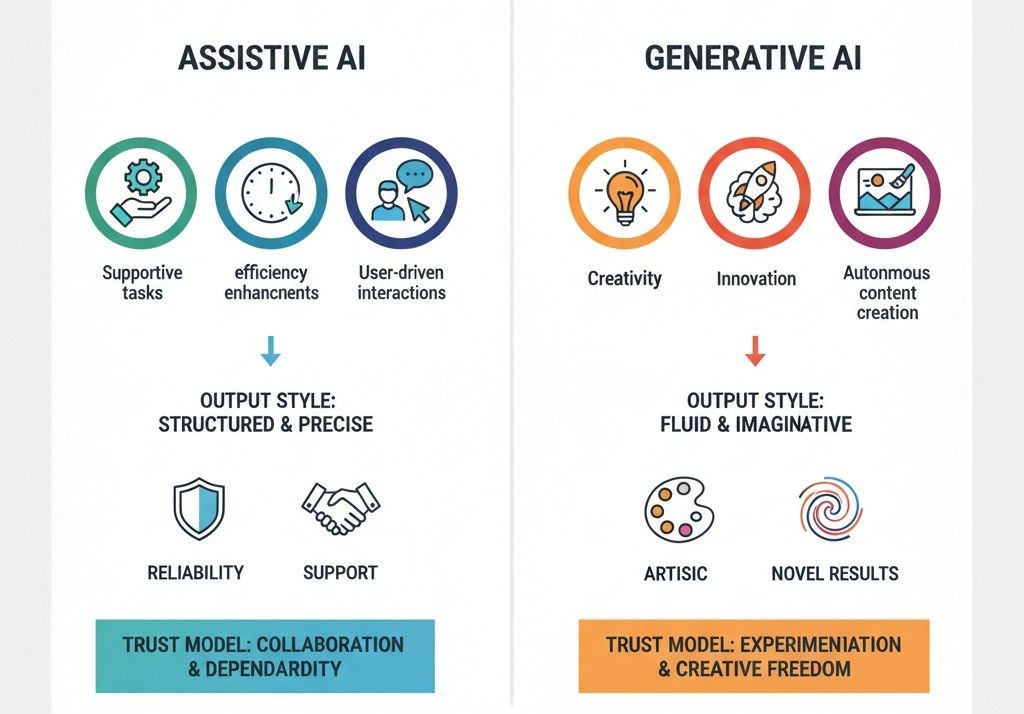
Assistive AI vs Generative AI: Comparison
Most people compare these two based on “capability.” The smarter comparison in 2026 is risk, predictability, and workflow fit. Because in real teams, the question is not “can it write?” It’s “can we trust it inside a system people rely on?”
Here’s the clean breakdown.
Quick Comparison Table
Decision factor | Generative AI | Assistive AI |
Primary job | Creates new output (drafts, ideas, summaries) | Supports a workflow (guides, validates, triggers actions) |
Output style | Variable, creative, sometimes inconsistent | Consistent, constrained, predictable |
Best fit | Content, brainstorming, first drafts | Ops, support, sales workflows, compliance-sensitive work |
Biggest upside | Speed and breadth of options | Reliability and repeatable execution |
Main risk | Confident but wrong output if not grounded | Over-restriction if rules are poorly designed |
Trust model | Needs review to be safe | Designed to be safe by default |
Governance | Harder without strict grounding | Easier because actions and boundaries are defined |
Great at | Drafting, rewriting, summarizing, generating alternatives | Triage, next steps, QA checks, escalation, structured updates |
How to decide
- •
If your work needs “a good first draft,” generative AI is usually the right tool.
- •
If your work needs “the right next step,” assistive AI wins almost every time.
That’s why mature teams in 2026 often use both: generative AI for creation, assistive AI for execution.
What Assistive AI Is Built For (And Why Teams Trust It More)
Assistive AI exists for a very different job than generative AI. It is not designed to create new content or invent responses. Its role is to support human work inside a defined workflow, using rules, context, and guardrails that keep outcomes predictable.
By 2026, most enterprise deployments favor assistive AI in operational roles because it behaves consistently. Instead of asking “what should I say next?”, assistive systems ask “what step should happen next?”
The Core Function of Assistive AI
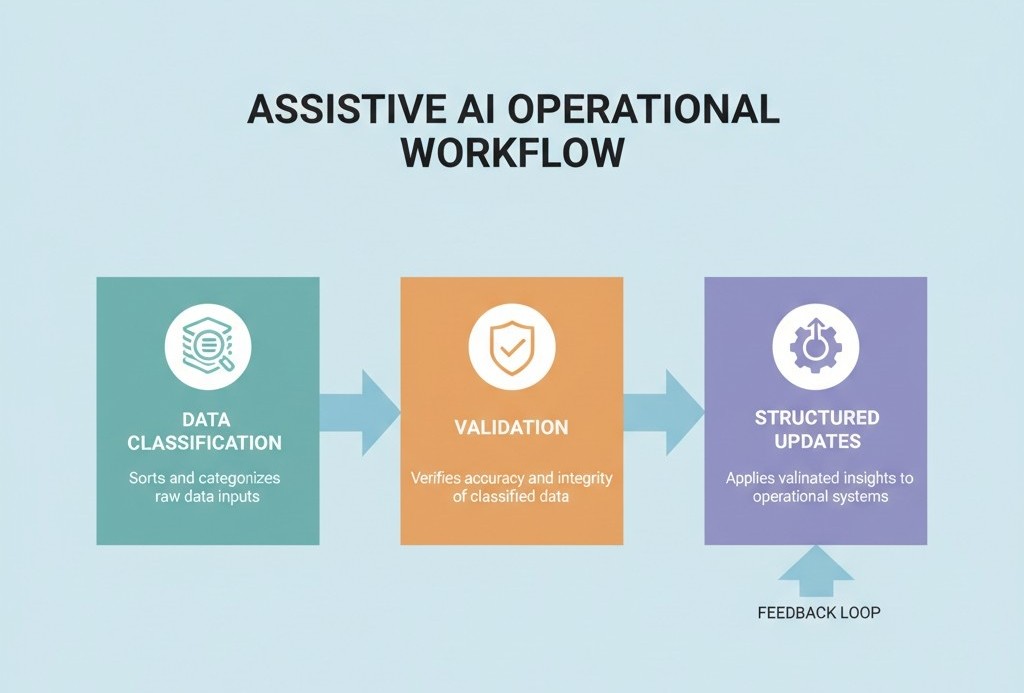
Assistive AI operates inside predefined boundaries. It observes activity, interprets signals, and recommends or executes actions that already exist in the system.
Common examples include:
- •
Suggesting the next best action during a support or sales interaction
- •
Pre-filling CRM fields based on verified signals
- •
Flagging risks, missed steps, or compliance gaps
- •
Triggering workflows only when confidence thresholds are met
This is why assistive AI is often described in research as decision support, not decision replacement.
Why Assistive AI Is Replacing “AI Copilots” in Operational Teams
Between 2024 and 2026, many organizations experimented with AI copilots layered on top of existing tools. To give humans a smart assistant and productivity will follow. In practice, that promise broke down in operational environments.
Copilots Help Individuals. Operations Need Systems.
In customer support, sales ops, and service delivery, work does not live with one person. It flows across:
- •
Tickets and queues
- •
CRM records and deal stages
- •
SLAs, handoffs, and escalations
- •
QA, reporting, and compliance
Copilots can assist a rep, but they don’t guarantee that the system stays consistent. This creates a gap between what happened and what the organization believes happened.
“Generative AI produces possibilities. Assistive AI produces reliable next steps.”
That distinction is why, in 2026, most serious teams no longer ask which model is more powerful. They ask which one fits the job without introducing risk.
What AI Services is a workflow-first system that uses assistive AI patterns to make support, sales and ops behave more predictably and scale with less manual drag.

How What AI Services Designs AI Roles Inside a Workflow (Not Just Adds Tools)
Most teams add an AI tool on top of existing systems and hope for magic. What AI Services work the opposite way. It starts from the workflow, breaks it into decisions, and then assigns very specific jobs to AI so it behaves like part of the operation, not a clever plugin.
The goal is: AI should have a clear role, clear boundaries, and clear metrics. If it does not, it becomes noise.
1. Start With the Real Workflow, Not With Features
A typical engagement does not begin with “let’s add a bot to support”. It starts with mapping the flow of work.
For example, in customer support or post-sale operations, What AI Services will map:
- •
How requests arrive
- •
How they are classified today
- •
How authentication happens
- •
Which systems hold the truth
- •
When humans decide to escalate, refund, reschedule, or close
- •
Which records must be updated for the business to stay in sync
This is documented as a chain of decision points, not as a tool wishlist. That mapping decides where AI can safely act and where it should only assist.
2. Assign Specific AI Roles Inside the Flow
Once the decisions are clear, What AI Services assigns distinct AI roles instead of one “catch all assistant”.
Common roles in a support or revenue workflow look like this:
Role 1: Intake and classification AI detects intent, urgency, language, risk level and maps each interaction to the right queue, policy and system. This removes manual triage and keeps humans focused on work that actually needs judgment.
Role 2: Resolution assist, not replacement Here AI retrieves knowledge from SOPs and knowledge bases, suggests replies, drafts actions, and outlines next steps. The human still owns the final move where stakes are high, but they are no longer starting from scratch every time.
Role 3: Enforcement and system-of-record updates This is where What AI Services leans hardest into assistive AI. The system updates tickets, CRM fields, order statuses and follow up tasks in a structured way, using rules and confidence thresholds defined up front. Nothing free text. Nothing untracked.
Each role is scoped so it can be measured and tuned. If a role cannot be measured, it is redesigned before going live.
3. Build Guardrails Around Expensive Mistakes
What AI Services treats guardrails as part of the design, not as a late patch.
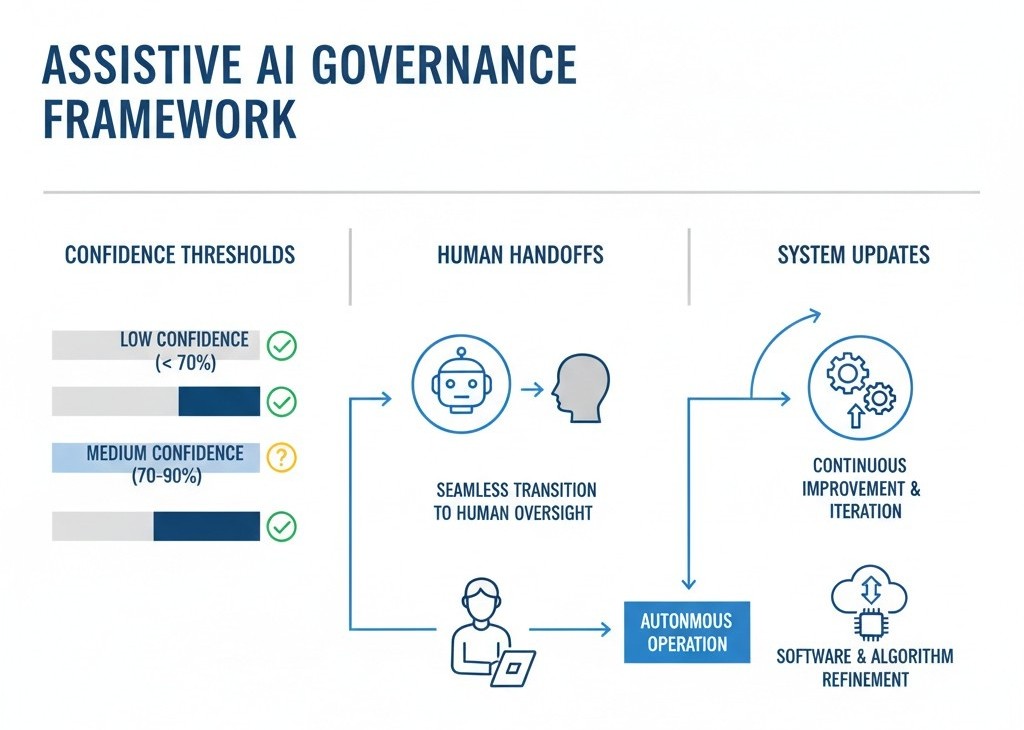
For each workflow, the team decides:
- •
Which fields AI is allowed to update
- •
Which actions require human confirmation
- •
Confidence thresholds for auto-actions vs suggestions
- •
What happens when confidence is low or data is incomplete
- •
How every automated action is logged and reviewable
If a wrong action would cost money, damage trust, or create compliance exposure, AI is put in assistive mode only. It can draft, flag, and propose, but humans confirm.
4. Design Human Handoffs, Not Just “Escalations”
Most AI deployments treat escalation as a fallback. What AI Services designs it as a first class part of the experience.
In a typical What AI Services setup, handoff includes:
- •
A short, structured summary of what happened so far
- •
Confirmed identity and relevant account context
- •
The decision the AI tried to make and why
- •
Actions already taken in systems
- •
Suggested next steps for the human
This prevents the classic “please repeat your issue” loop and lets agents operate as decision makers, not log searchers.
5. Instrument Everything So AI Can Improve
AI roles are not considered “done” when they are deployed. They are considered “live” when they can be measured.
What AI Services typically instruments:
- •
Resolution rate by intent
- •
Escalation rate and quality
- •
Reopen or repeat contact rate
- •
Time to first response and time to resolution
- •
SLA compliance and near-misses
- •
QA patterns and coaching signals
Those metrics decide where to expand automation, where to dial it back, and where to retrain models or tighten rules. Without that feedback layer, AI is just a feature. With it, AI becomes an operational capability that compounds over time.
Where This Puts What AI Services In The AI Landscape
This way of working is exactly why it is more accurate to position What AI Services as an assistive AI workflow layer, not a “chatbot vendor” or “AI model provider”.
- •
Generative models are used inside the system, but never as the only guardrail.
- •
The focus is on how work moves, not how impressive a single response looks.
- •
AI is given specific jobs inside the workflow, with boundaries and accountability.