
Revolutionize Your CRM: How AI Voice Assistants Boost Efficiency and Sales
CRM systems were originally built to store information. Over time, they became places where sales data lives, but not where sales decisions happen. By 2026, that gap has become impossible to ignore. Sales teams are overwhelmed by calls, meetings, follow-ups, and manual updates, while CRMs quietly fall out of sync with reality.
This is where ai voice assistant crm integration has shifted from “nice to have” to operational necessity.
Modern AI voice assistants no longer just transcribe conversations. They listen, interpret intent, capture structured insights, trigger workflows, and update CRM records in real time. Instead of asking sales reps to remember what to log after every interaction, the system now listens during calls, meetings, and follow-ups and does the work automatically.
The result is cleaner pipelines, faster deal movement, and fewer missed opportunities.
Industries with high call volume, such as fitness, healthcare, real estate, and B2B SaaS, have seen particular gains. For example, health club ai sales assistant crm integration is now being used to automatically qualify leads, tag intent, book trials, and route hot prospects without manual intervention.
Gartner’s 2025–2026 predictions highlight AI agents compressing sales cycles and changing how work gets executed across commercial teams. And vendors are racing to make CRM updates “hands-free” and immediate, whether that’s through native call summaries inside CRM or third-party meeting assistants that sync to deals and contacts.
This blog breaks down the practical “how” integration patterns, data mapping, governance, and what actually moves efficiency and conversion.

The 2026 CRM: How AI Voice Assistants Integrate With CRM Systems
For most sales teams, CRM integration has traditionally meant one thing: after a call ends, someone needs to remember to update the system. Notes get added later, fields are half-filled, follow-ups are missed, and the CRM slowly drifts away from what actually happened in conversations.
AI voice assistants change that dynamic by sitting much closer to where selling really happens, inside calls and meetings. Instead of treating conversations as something to summarize later, the system listens as they happen and connects them directly to the CRM. Calls, demos, and discovery meetings become live data sources rather than isolated events.
This doesn’t require sales reps to change how they work. They still use the same dialers, meeting tools, and calendars. The difference is that the AI assistant is quietly capturing context in the background: who the customer is, what they’re asking about, whether they sound ready to move forward, and what was agreed on before the call ended. That context is then reflected in the CRM almost immediately.
Ai Voice Integration Vs “Call Recording” Tools
The difference is interpretation. A raw transcript doesn’t tell a sales manager whether a deal is healthy or stuck. It tells whether the system understands why the customer called, what they cared about, and what should happen next.
Today’s AI voice assistants are designed to extract meaning rather than just words. They recognize patterns like buying signals, objections, timeline mentions, or uncertainty. When a prospect says they need internal approval or compares pricing with a competitor, that information doesn’t stay buried in a conversation. It becomes structured insight that the CRM can act on.
Over time, this creates a noticeable improvement. CRM records stop looking like personal note dumps and start looking like consistent, decision-ready data. Every interaction is processed the same way, regardless of which rep handled the call, which improves reliability across the entire pipeline.
How CRM Updates and Workflows Stay in Sync
Once insights are captured, the AI updates the CRM in a controlled way. It doesn’t overwrite everything or flood records with unnecessary detail. Instead, it focuses on what actually matters: updating deal stages, logging outcomes, creating follow-up tasks, and attaching short summaries that are easy to scan later.
Because these updates happen immediately, workflows can trigger at the right moment. A strong buying signal can prompt a same-day follow-up. A stalled conversation can surface risk early. Managers get visibility without asking reps to report manually, and reps spend less time on admin work after calls.
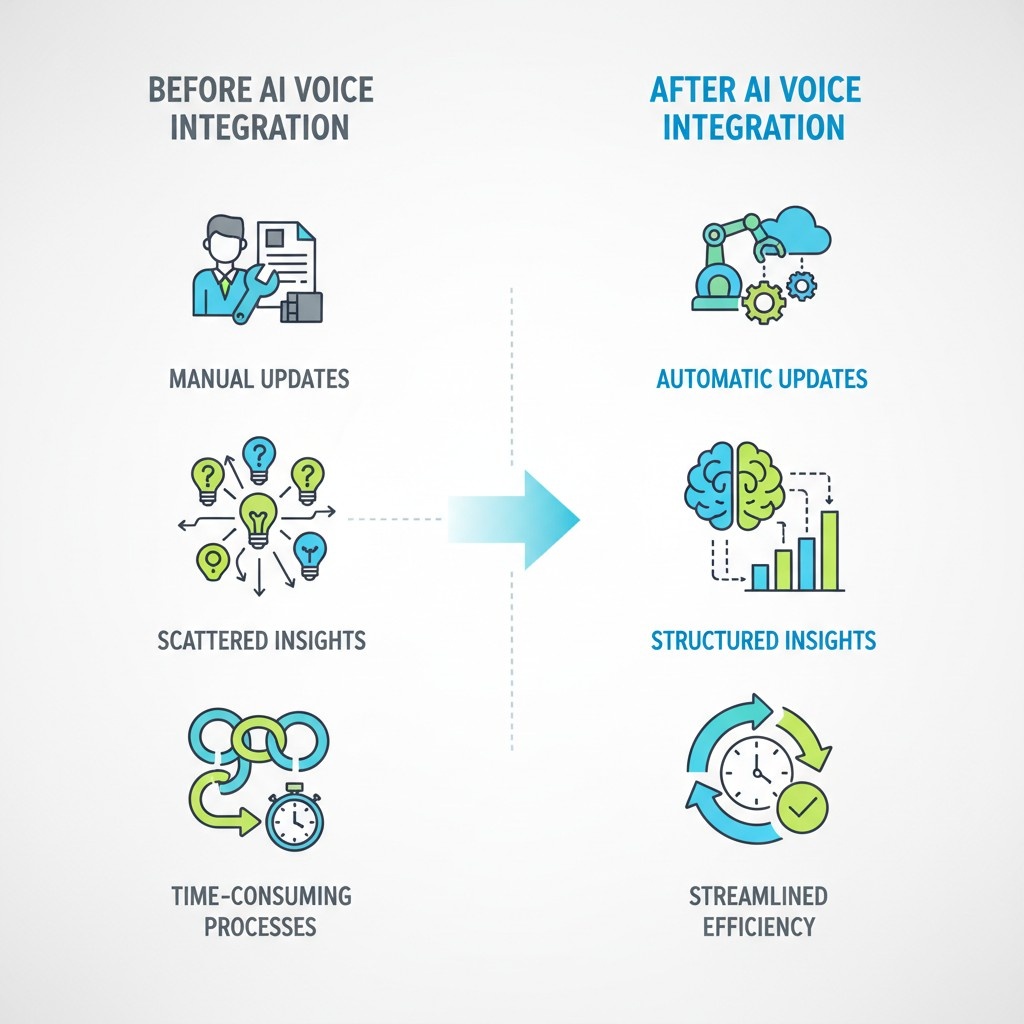
What Changes | Before AI Voice Integration | After AI Voice Integration |
CRM updates | Manual and delayed | Automatic and timely |
Call insights | Scattered in notes | Structured and consistent |
Follow-ups | Easy to forget | System-driven |
Data quality | Varies by rep | Standard across team |
CRM usage | Often forced | Naturally adopted |
This is why AI voice assistants are becoming a core part of CRM strategy rather than a bolt-on tool. They don’t just help teams capture conversations, they help CRMs reflect reality, which is ultimately what sales leaders rely on to make decisions.
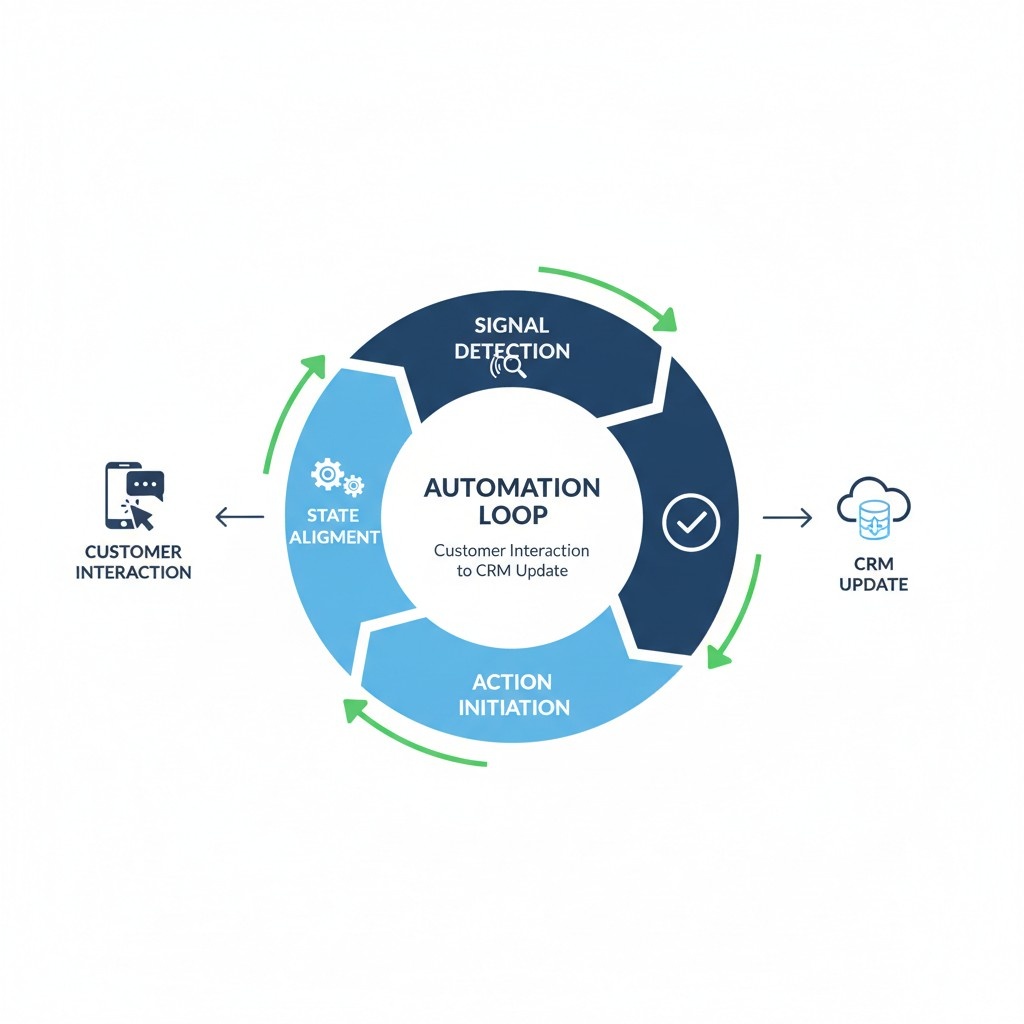
What “Good” Looks Like: The Automation Loop From Call → CRM
Once CRM integration is in place, the real question stops being can the system capture conversations? and becomes what actually happens after a call ends? This is where many implementations quietly fail. They collect data, but they don’t close the loop.
In mature sales operations, “good” automation is not measured by how much data flows into the CRM, but by whether that data reliably triggers the right actions at the right time. The automation loop is what turns conversations into momentum.
A healthy loop has a clear start and a clear finish. It begins with a customer interaction and ends with the CRM being ready for the next move, without human cleanup work in between.
From Signal Detection to Actionable CRM State
The defining characteristic of a strong automation loop is selectivity. Not everything a customer says should matter. Research from sales analytics literature and decision-support systems consistently shows that over-capturing information reduces system trust and adoption. High-performing systems focus on a narrow set of signals that correlate with deal movement.
In practice, this means the AI listens for moments that change the state of the opportunity. A pricing discussion, a timeline commitment, hesitation around authority, or a request for documentation are all signals that alter what should happen next. The automation loop evaluates these signals and decides whether the CRM state should remain unchanged, advance, or flag risk.
This is where the loop differentiates itself from basic automation. Instead of reacting to every interaction, it waits for meaningful thresholds. When those thresholds are crossed, the CRM is updated in ways that align with how sales leaders actually think about pipeline health.
Well-designed systems apply automation in three tightly controlled phases:
- •
Signal qualification: filtering noise from intent-bearing moments so that only decision-relevant signals enter the CRM
- •
State alignment: mapping those signals to CRM objects such as opportunity stage, deal confidence, or next action
- •
Action initiation: triggering follow-ups, reminders, internal alerts, or handoffs based on the updated state
Each phase is deliberately constrained. This constraint is what prevents over-automation and keeps sales teams engaged with the system.
What research consistently shows is that adoption improves when reps can predict how the system will behave. When similar conversations produce similar CRM outcomes, trust builds quickly.
Strong Automation Loop Supports Learning at Scale
Because signals are captured consistently, teams can analyze patterns across hundreds or thousands of calls. Over time, this reveals which types of conversations tend to stall deals, which commitments actually convert, and where intervention matters most.
This feedback loop is subtle but powerful. The CRM stops being a static record and becomes a system that reflects how selling actually unfolds, not how it is supposed to look on paper.
Just as importantly, good automation knows when not to act. Many academic studies on human–AI collaboration emphasize the importance of restraint. Systems that escalate everything or trigger actions too aggressively tend to be overridden or ignored. High-performing loops leave space for human judgment while quietly removing repetitive, low-risk decisions.
When done right, the automation loop does not feel like a layer added on top of sales work. It feels like the CRM is finally keeping up with reality. Conversations move forward, records stay current, and next steps are clear without anyone needing to ask, “Did this get logged?”
That is what “good” looks like l, not more automation, but automation that completes the journey from call to CRM to action without friction.
Integration Pattern #1: Call Summaries and Field Writeback Inside CRM
The most widely adopted pattern in AI voice–CRM integration is also the most misunderstood. Call summaries and field writeback are often treated as a “basic” feature, but in well-run systems, they form the foundation for trust, governance, and long-term adoption.
At its best, this pattern doesn’t try to automate decision-making. It focuses on documentation accuracy and data hygiene, two areas where manual processes consistently break down as call volume increases.
Native Call Summaries + Editable Notes for Governance and Trust
In strong implementations, call summaries are written inside the CRM, not attached as external files or links. This distinction matters more than it seems. Native summaries behave like first-class CRM data: they inherit permissions, audit logs, object relationships, and lifecycle rules.
From a governance perspective, this is critical. Research on enterprise system adoption shows that users are far more likely to trust automated inputs when they can review, edit, and correct them. Editable summaries give sales reps a sense of control without reintroducing manual work at scale.
What works well here is a restrained approach. Effective summaries are short, structured, and consistent in format. They typically capture:
- •
Why the customer engaged
- •
What was discussed at a high level
- •
What was agreed to before the call ended
By avoiding excessive detail, the system prevents CRM records from becoming cluttered while still preserving institutional memory.
Where Native Tooling Wins and Where It’s Limited
Native CRM tooling has clear advantages. Security models, object-level permissions, and compliance controls are already in place, which simplifies enterprise rollout. Data stays within approved systems, reducing legal and operational risk. For regulated industries, this is often non-negotiable.
However, native tooling also has limits. CRM platforms are optimized for records, not for continuous interpretation of live conversations. As a result, native summaries and writeback work best for documentation and oversight, not for real-time decision support.
This is why most mature stacks pair native CRM writeback with external AI processing layers. The AI does the heavy interpretation work, while the CRM remains the system of record. When this boundary is respected, teams get the best of both worlds: intelligence without losing control.
Integration Pattern #1 succeeds because it doesn’t try to do everything. It focuses on accuracy, consistency, and trust, the prerequisites for any deeper automation to work later.
Integration Pattern #2: AI Sales Assistant CRM Integration After Calls
Once a call ends, most sales teams lose momentum. Notes are added later (or not at all), follow-ups slip, and the CRM lags behind reality. This integration pattern exists to fix that specific break in the chain. It focuses on what happens after the conversation—when intent is freshest and timing matters most.
Unlike live assistance, post-call AI is designed for accuracy and completeness, not speed. The system reviews the full interaction, reconciles context across the account and pipeline, and then updates the CRM in a way that reflects what actually changed because of the call. This is where sales operations see the biggest lift in data quality with the least disruption to reps.
Post-Call Intelligence That Moves Deals Forward
Research in sales analytics and decision-support systems shows that the most reliable signals of deal movement often appear at the end of conversations: confirmed next steps, clarified timelines, softened objections, or a clear stall. Post-call AI is optimized to capture these signals and translate them into CRM state changes that are easy to act on.
In practice, strong implementations do three things consistently:
- •
They summarize outcomes, not conversations, keeping CRM notes short and decision-ready.
- •
They update fields that matter (stage, next action, risk flags) instead of flooding records with raw text.
- •
They initiate follow-ups automatically, ensuring nothing relies on memory once the call is over.
Because these updates happen minutes after the interaction, managers get near-real-time visibility into pipeline health without asking reps to report. Over time, this tight feedback loop improves forecasting accuracy and reduces the manual cleanup that typically happens at the end of the week or quarter.
What makes this pattern effective is restraint. The AI does not attempt to judge performance or coach in the moment. It focuses on capturing the delta, what changed because of the call and aligning the CRM accordingly. That clarity is what keeps teams engaged and prevents automation fatigue.
Integration Pattern #2 works best when paired with clear rules about ownership and thresholds. High-confidence outcomes can update records automatically, while ambiguous signals remain editable. This balance preserves trust while still delivering the operational gains that post-call automation promises.

Integration Pattern #3: AI Call Assistant CRM Integration Sales Call
This pattern is where AI stops being a back-office processor and becomes a live participant in the sales workflow. Unlike post-call automation, which optimizes accuracy and completeness after the fact, real-time call assistance focuses on decision support in the moment, when a rep still has the opportunity to steer the conversation.
Research from human–AI collaboration and real-time decision systems consistently shows that assistance is most effective when it reduces cognitive load without interrupting flow. That insight shapes how modern call assistants operate during sales calls: they listen continuously, but surface input selectively.
Live call assistance also changes how teams think about consistency. In traditional setups, experienced reps naturally cover critical ground, while newer reps may miss it. Real-time AI reduces that gap by acting as a quiet safety net, helping standardize call quality without enforcing rigid scripts.
This integration pattern works best when it complements, rather than competes with, post-call automation. The live assistant helps shape the conversation, while after-call systems finalize documentation and follow-through. Together, they create continuity from spoken word to CRM record to next action.
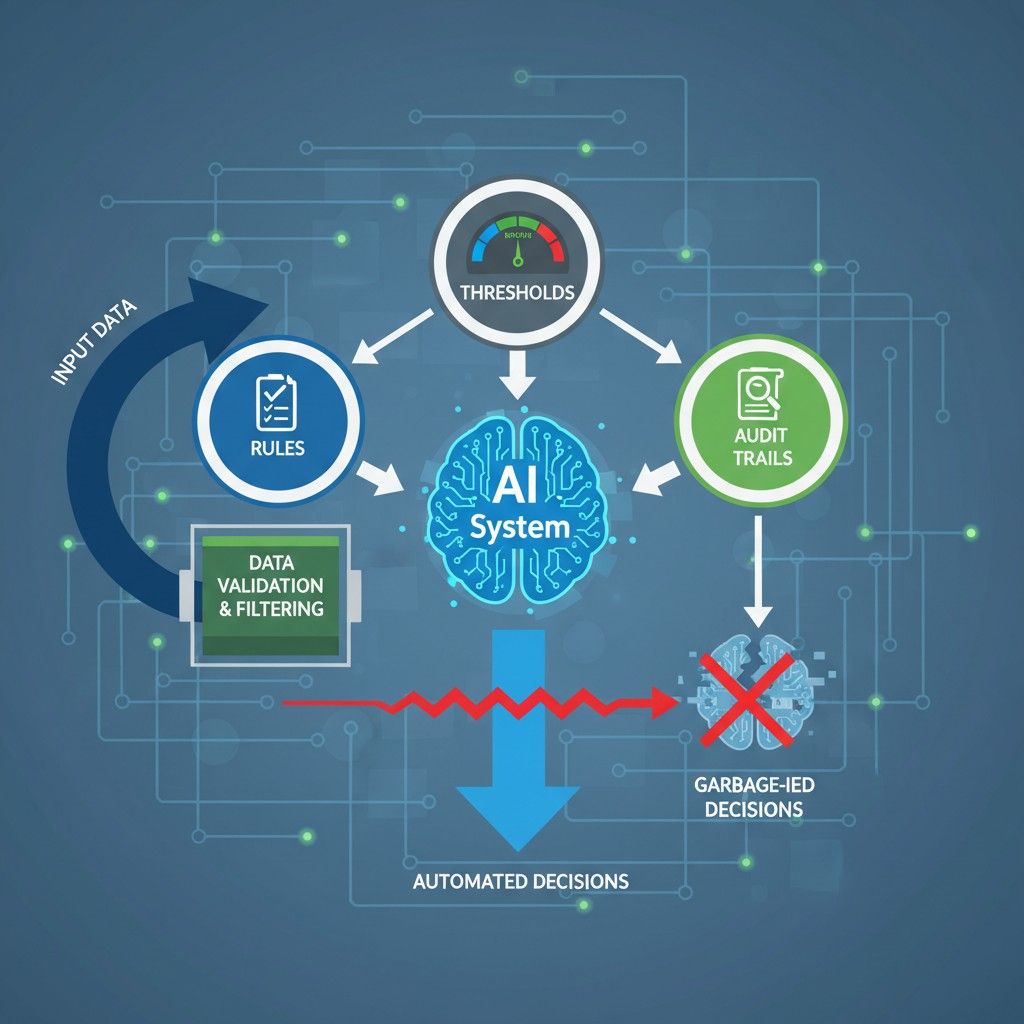
Governance: Preventing “Garbage-In Automation”
Automation only works when the inputs are trustworthy. Without governance, AI-powered CRM workflows don’t fail loudly, they fail quietly, by reinforcing bad data faster than humans ever could. This is what teams often experience as “automation gone wrong,” when systems technically function but decisions get worse instead of better.
Governance exists to prevent that outcome. It defines what the AI is allowed to capture, how it interprets information, and where automation must stop and defer to human judgment. In research on data-driven decision systems, one consistent finding stands out: organizations lose confidence in automated tools not because they are inaccurate, but because their behavior is unpredictable. Good governance makes automation predictable.
Implementation Blueprint (30/60/90 Days) + ROI Metrics
Successful AI sales assistant deployments don’t happen all at once. The teams that see real returns follow a phased approach that prioritizes data integrity first, automation second, and optimization last. This sequencing is consistent with research in enterprise system adoption, which shows that early over-automation increases failure risk, while gradual capability layering improves long-term usage and trust.
0–30 Days: Map Objects, Outcomes, Fields, and Workflows
The first 30 days are not about AI performance. They are about alignment. Before any automation is enabled, teams need clarity on how sales outcomes are represented inside the CRM and which moments in a call actually matter.
This phase typically focuses on mapping CRM objects (leads, contacts, opportunities), defining what a “meaningful outcome” looks like after a call, and identifying which fields should change when those outcomes occur. Workflows are documented rather than automated, ensuring that everyone agrees on how the system should behave before it does anything on its own.
This groundwork prevents misaligned updates later and gives sales, operations, and leadership a shared mental model of the automation loop.
31–60 Days: Enable Writeback, QA Checks, and Task Automation
Once mappings are stable, automation can begin carefully. In this phase, AI-driven writeback is enabled for a limited set of high-confidence updates, such as call summaries, next-step fields, and follow-up tasks. Quality assurance checks are layered in to ensure that updates remain accurate and editable.
This is also where task automation starts to deliver visible value. Follow-ups no longer rely on memory, and CRM hygiene improves without increasing rep workload. Importantly, automation is still monitored closely, with clear rollback paths if adjustments are needed.
By the end of this phase, teams usually see early efficiency gains without feeling like control has been taken away.
61–90 Days: Coaching Dashboards and Continuous Tuning
The final phase focuses on learning and refinement. With consistent data flowing into the CRM, teams can now surface coaching dashboards that highlight patterns across calls rather than isolated events. These insights are used to improve sales behavior, refine qualification criteria, and adjust automation thresholds.
Continuous tuning becomes part of normal operations. Automation rules are updated as sales motions evolve, ensuring that the system remains aligned with how deals are actually won. At this stage, AI is no longer viewed as a new tool, it becomes part of the sales infrastructure.
KPIs That Matter for ROI
Measuring success requires more than activity counts. Research on sales productivity emphasizes outcome-linked metrics over surface-level usage. The most reliable indicators of ROI in AI-assisted CRM deployments include:
- •
Time saved per rep, particularly reduction in post-call administrative work
- •
Activity completeness, measured by how consistently CRM records reflect real interactions
- •
Stage conversion rates, especially movement between early and mid-funnel stages
- •
Speed-to-follow-up, capturing how quickly next actions occur after a call
Together, these metrics show whether automation is improving decision quality and execution speed, not just reducing manual effort. As vendors compete to become the top ai voice assistants with crm integration, differentiation now comes down to governance and writeback depth.
When implemented with discipline, the 30/60/90 blueprint turns AI from an experiment into a measurable growth lever, one that compounds over time rather than creating short-term gains followed by fatigue.